Functional Description
This page provides detailed information about all components and features of the evroc compute service. For a high-level overview, see the Compute Service Overview.
The evroc compute service gives you on-demand virtual machines with flexible compute, storage, and networking resources. Built on a modular architecture, the service lets you mix and match components to create the exact infrastructure your applications need - from simple web servers to complex multi-tier architectures with GPU-accelerated workloads.
How resources work together
The evroc compute service uses a modular architecture where compute, storage, and networking resources can be managed independently. This gives you flexibility to, for example, replace a VM while keeping its Public IP, or move data disks between VMs without losing data.
All resources live in a project - a logical container for your cloud infrastructure. Each project includes VMs, networking, storage, and security components that you can configure to meet your needs.
The diagram below shows how VMs, networking, storage, and security resources connect in the evroc cloud.
Green resources are created automatically in each project. You can modify or delete them after creation.
Yellow resources are created automatically in each project. You can delete them after creation, but you cannot modify them.
Blue resources are created, updated, and deleted by you.
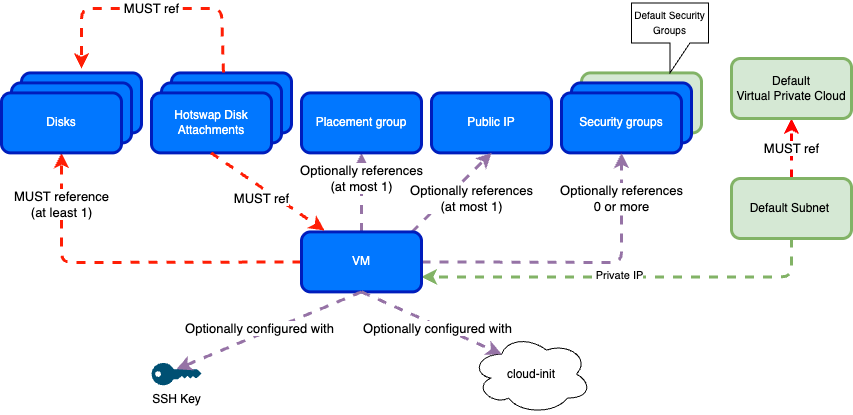
In practice: your VM connects to a subnet for internet access using IPv6, and if using IPv4, for internal communication, optionally uses an IPv4 Public IP for internet access, and follows security group rules for traffic control. Storage disks attach independently so you can preserve data when replacing VMs, and hotswap disk attachments let you add or remove disks from running VMs without downtime. Placement groups keep VMs on separate hardware for high availability. SSH keys enable secure remote access, and cloud-init scripts provide automated configuration at boot.
Regions and zones
Resources in the evroc compute service are either zonal or regional. Zonal resources—VMs, disks, hotswap disk attachments, placement groups, and subnets—exist in a specific availability zone. Regional resources—VPCs, Public IPs, and security groups—span all zones in a region.
VMs in different zones can communicate with each other over the private network within a VPC, subject to security group rules. This allows you to distribute workloads across zones for higher availability while maintaining connectivity.
For details on zone naming, availability benefits, and designing for high availability, see Regions and zones.
Virtual machines
VMs are the primary compute resources in the evroc cloud. Each VM provides dedicated virtual CPU, memory, and optional GPU resources for your workloads. You have full control over the VM's running state and can configure network access by attaching Public IPs and configuring security groups.
Required components
Every VM must have a:
- Boot disk - The operating system disk, configured with a pre-installed OS image.
- Resource profile - CPU, memory, and optional GPU allocation. Options include:
- General-purpose, memory-optimized, and compute-optimized (2-32 vCPUs, 4-128 GB RAM).
- GPU instances with configurable number of GPUs (up to 4x L40S or 8x B200).
- Private network connection - Automatically created for VM-to-VM traffic within a VPC.
Optional components
You can add:
- Public IP - Required for inbound access to the VM from the public internet.
- SSH key - For secure remote login to the VM (at least one required at creation time if SSH access is required).
- Additional data disks - Up to 9 data disks per VM.
- Placement group - Ensures the VM is deployed on different physical hosts from others in the group.
- Cloud-init user-data script - Customizes the VM at boot time.
VM lifecycle operations
Once created, you can:
- Stop and start the VM
- Attach and detach disks and public IP addresses
- Dynamically attach and detach disks to running VMs using hotswap disk attachments
- Assign and unassign security groups
- Add or remove the VM from placement groups
- Resize a VM to a different resource profile.
For more details, see the how-to guides.
Storage
Persistent disks provide storage for your VMs. All disks use SSD-backed block storage to ensure high performance, availability, and reliability. Disks can be independently created and attached to any VM, and data persists beyond individual VM lifetimes. Disks can also be snapshotted, and new disks can be created from these snapshots - see snapshots for more details.
Boot disks
Each VM requires exactly one boot disk. Boot disks are configured with a disk image that defines the VM's operating system. Available operating systems include:
- Ubuntu (24.04, 22.04)
- Ubuntu-minimal (24.04)
- Rocky Linux (10.0, 9.6, 8.10)
- SLES (15.6, 15.5)
- openSUSE (15.6, 15.5)
- SL Micro (8.1)
Note: For the exact string required to specify the OS in the CLI see the available disk images.
Boot disks can be up to 4 TB in size. If no size is specified, a default size is used based on the selected image (typically 50 GB).
Data disks
VMs can have up to 9 additional data disks for storage. Each data disk:
- Can be up to 4 TB in size
- Is created unformatted and must be formatted by you
- Can be attached and detached from VMs independently
- Persists beyond the VM lifecycle and can be reattached to new VMs
For more details, see Disks.
GPU VM local storage
GPU VMs also include local SSD storage for extremely low-latency, high-throughput data access.
Networking
The evroc compute service provides comprehensive networking capabilities to connect your VMs and control traffic flow. Each project includes automatic networking configuration, with options for customization.
Default networking components
To simplify the experience of deploying a VM, each project is automatically configured with a complete networking environment that includes:
- Virtual Private Cloud (VPC) - An isolated network environment for your resources that spans all zones in the region.
- Subnets - One subnet per zone, each with its own globally routable IPv6 address range and private IP address range for internal VM-to-VM communication. VMs are automatically assigned a globally routable IPv6 address (and a private IPv4 address if dual-stack) from their zone's subnet when created.
- Default security groups - Four security groups are created by default:
default-allow-egress- Allows outbound traffic to the internet (both IPv4 and IPv6). Add VMs to this group explicitly if they need outbound connectivity to the internet.default-allow-intra-vpc- Allows inbound and outbound traffic from IP addresses which are part of the default VPC. Add VMs to this group explicitly if they need to communicate with other VMs within the default VPC.default-allow-web-protocols- Allows HTTP (port 80) and HTTPS (port 443) traffic from any source. Add VMs to this group explicitly if they serve web traffic.default-allow-ssh- Allows SSH access (port 22) from any IP address. Add VMs to this group explicitly if they need SSH access from the internet.
- Internet connectivity - VMs can make outbound connections to the internet (if security groups allow). Inbound connections from the internet require using IPv6,or a Public IPv4 address, and appropriate security group rules.
The default VPC and subnets are dual-stack, supporting both IPv4 and IPv6 addresses.
Configurable networking resources
You can create and configure additional networking resources:
- VPCs - Create additional isolated network environments with custom CIDR blocks and stack types (dual-stack or IPv6-only).
- Subnets - Create subnets with custom IP ranges within your VPCs.
- Public IPs - Persistent public IPv4 addresses that can be created and assigned to a VM. They are required for inbound access to a VM from the public internet. Once allocated, the IP address is persistent and can be reassigned to different VMs as needed.
- Security groups - Custom firewall rules that implement fine-grained controls to allow or deny traffic, filtered by protocol, direction, IP addresses, and port numbers. Security group rules control traffic by port, protocol, and source IP/CIDR range, or by referencing other security groups.
For example, you might run three VMs for a web application inside the same subnet, each with a Public IP for external users, and a database VM with only private access for internal communication.
For more details, see Virtual Private Clouds, Subnets, Public IPs, Security Groups, and Default Networking Setup.
Placement groups
By default, VMs may be scheduled on the same physical host. Placement groups allow you to control VM placement to improve availability.
Placement groups enforce a strict spread placement strategy for high-availability deployments. This ensures VMs run on distinct physical hardware for anti-affinity, making your deployment resilient to the failure of a single host. You can add up to 5 VMs to a single placement group.
To use placement groups, create a placement group with the spread strategy, then add VMs to it when creating them or afterward.
For more details, see Placement Groups.
VM configuration and access
SSH keys
SSH keys provide secure authentication for accessing your VMs. Password authentication is disabled by default in evroc VMs, making SSH keys the primary access method. If you need to access a VM over SSH, you must configure at least one SSH public key when creating it - either through the Console/CLI/API or via cloud-init.
Cloud-init
Cloud-init is an industry-standard tool for automating VM configuration at boot time. The evroc compute service includes cloud-init in all OS images, allowing you to customize VMs during their first startup.
With cloud-init, you can:
- Install and configure additional packages.
- Configure the operating system to your needs.
- Add SSH keys and configure user access.
- Format and mount additional disks.
- Run custom scripts and commands.
Example cloud-init configuration:
#cloud-config
packages:
  - nginx
users:
  - name: admin
    ssh-authorized-keys:
      - ssh-rsa AAAA...
For more details, see Cloud-init and Using custom cloud-init userdata.
Managing compute resources
You can create and manage compute resources through the console, CLI, or REST API. See the how-to guides for step-by-step instructions on common tasks.