Default Networking Setup
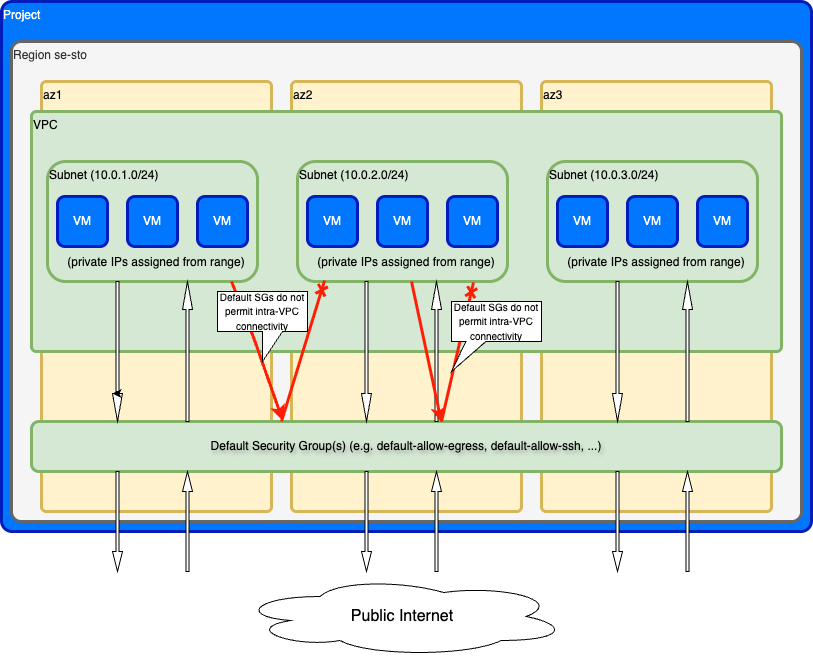
When you create a project in evroc, a complete networking environment is automatically configured for you. This default setup includes all the essential components needed to deploy VMs with both internal and external connectivity.
What gets created automatically
Each new project includes:
- Virtual Private Cloud (VPC) - An isolated network environment for your resources, spanning all zones in the region.
- Subnets - One subnet per zone, each with a public IPv6 GUA block and, if dual-stack, its own private IP address range for VM-to-VM communication.
- Default Security Groups - Firewall rules controlling network traffic to and from VMs.
These resources are created automatically. You can modify or delete the VPC and Subnets after creation if you choose, and you can additionally delete the Security Groups.
How the components work together
VPC and subnets
VPCs provides network isolation for your resources and spans all availability zones in the region. The default VPC is dynamically asigned a /56 globally routable IPv6 CIDR block, and the 10.0.0.0/16 IPv4 CIDR block of private addresses.
Each zone has its own default subnet which is dynamically asigned a /64 globally routable IPv6 CIDR block, and a dedicated IP address range:
| Zone | Subnet | CIDR (IPv4) | CIDR (example IPv6 - dynamically assigned) |
|---|---|---|---|
| se-sto-a | default-se-sto-a | 10.0.1.0/24 | 2a13:a0c4:110:8b02::/64 |
| se-sto-b | default-se-sto-b | 10.0.2.0/24 | 2a13:a0c4:110:8b03::/64 |
| se-sto-c | default-se-sto-c | 10.0.3.0/24 | 2a13:a0c4:110:8b01::/64 |
et provides 252 usable private IPv4 addresses for VMs (4 addresses are reserved for the network address, default gateway, broadcast address, and one additional system address), and a /64 IPv6 CIDR block containing 2^64 (18.4 quintillion) addresses. When you create a dual-stack VM, it is assigned a private IPv4 address from the subnet you attach the VM to (in addition to a globally routable IPv6 address from that subnet).
VMs in different zones can communicate with each other over the VPC's private network, subject to security group rules.
Internet connectivity
VMs can connect to the internet as follows:
- Outbound traffic:
- IPv4: Uses a shared IP address unless you attach a Public IP to the VM.
- IPv6: Uses the VM's globally routable IPv6 address (GUA).
- Inbound traffic:
- IPv4: Requires you to attach a Public IP to the VM and configure appropriate security group rules.
- IPv6: Uses the VM's globally routable IPv6 address, and requires appropriate security group rules.
Default security groups
Security groups use a default-deny model: all traffic to a VM not explicitly allowed by one of the security group rules is blocked.
All projects include four preconfigured security groups:
default-allow-egress:
- Allows all outbound traffic from VMs to the internet (both IPv4 and IPv6)
- Must be explicitly added to VMs that need outbound connectivity.
VMs are automatically added to this security group unless you specify different security groups when creating the VM. This group doesn't allow VMs to communicate with each other.
default-allow-intra-vpc:
- Allows all inbound and outbound traffic from IP addresses which are part of the default VPC.
This group allows general inter-VM communication for VMs which are attached to Subnets within the default VPC.
default-allow-web-protocols:
- Allows HTTP traffic (TCP port 80) from any IP address
- Allows HTTPS traffic (TCP port 443) from any IP address
Rules cover both IPv4 and IPv6 traffic. Add VMs to this group if they serve web traffic and need to accept HTTP/HTTPS connections from the internet. This group doesn't allow general inter-VM communication.
default-allow-ssh:
- Allows SSH access (port 22) from any IP address
- Must be explicitly added to VMs that need SSH access from the internet
Rules cover both IPv4 and IPv6 traffic. This security group provides a convenient way to enable SSH access without creating custom rules. You can add it when creating a VM or update an existing VM to include it.
What you need to configure
While the basic networking is set up automatically, you'll need to configure:
- Public IPs - Create and attach these to VMs that need inbound internet access
- Custom Security Groups - Define firewall rules for traffic control
- SSH Keys - Configure SSH access to your VMs
If your VMs need to communicate with each other within the VPC - including within the same subnet - create a custom security group with rules that allow the required traffic between them.
Managing default resources
The default VPC, subnets, and security groups are created automatically. You can modify or delete the VPC and Subnets after creation if you choose, and you can additionally delete the Security Groups. For example, you can:
- Delete the default VPC and create your own VPCs with custom CIDR blocks.
- Delete default subnets and create subnets with different ranges.
- Create entirely new security groups to replace the defaults.
If you delete default resources, you can recreate them manually. Newly created projects always receive the default networking setup.
Next steps
- Learn about Regions and zones and how resources are distributed
- Learn about Virtual Private Clouds (VPCs)
- Learn about Subnets
- Configure Security Groups for custom firewall rules
- Learn how to create VMs
- Learn how to configure VPCs
- Learn how to configure subnets